
Screenshots
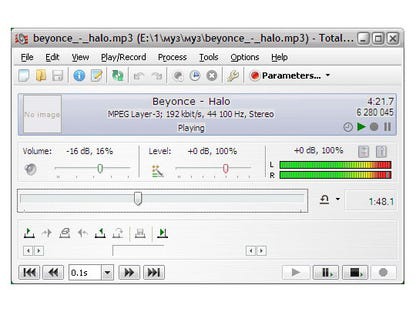


App details
- Updated
- November 7, 2013
- Requires
- Windows 8, Windows Vista, Windows, Windo...
- Developer
- High Criteria
- Category
- Mobile
SoftPas in:
This product is also available in the following languages:
About Total Recorder Standard Edition
Download Total Recorder Standard Edition – audio recording, audio converter, streaming audio, music recording, podcast recording, voice recording, digital audio, recording software, audio tool, audio utility
Overview
Total Recorder Standard Edition is a dedicated audio recording software designed for Windows users seeking a reliable tool to capture audio from diverse sources. It serves as a comprehensive solution for individuals who need to record streaming audio from media players, online content, voice calls, or physical audio inputs like microphones and analog devices. The app is particularly useful for users who want to preserve music, podcasts, voice memos, or live audio broadcasts without quality loss. It caters to both casual users and professionals in audio production, content creation, and personal archiving. The developer, Total Recorder, is known for creating specialized audio utilities with a focus on functionality and compatibility. The software is built for the Windows platform, offering a stable environment for audio capture and processing. Real-world use cases include converting vinyl records to digital formats, recording live webinars, capturing Skype conversations, and archiving music from online radio streams. In the broader software ecosystem, Total Recorder Standard Edition fills a niche for users who require precise, high-fidelity audio recording without relying on built-in system tools. Its ability to record directly in digital format sets it apart from many alternatives, making it a valuable asset for those prioritizing audio integrity.Key Features & Functionality
Total Recorder Standard Edition offers a suite of powerful features tailored for precise audio capture and flexible post-processing. The software supports recording from multiple sources, including streaming audio from RealPlayer, Windows Media Player, iTunes, and Internet telephony platforms like Skype and Google Talk. This versatility allows users to capture content from both local and online audio streams. A key technical advantage is direct digital recording, which captures audio in its native digital form without intermediate analog conversion, preserving original quality. The app supports a wide range of audio formats such as WAV, MP3, WMA, Ogg Vorbis, FLAC, and APE, with additional support for MPEG-4 and 3GP on Windows 7 and later. This ensures compatibility with most playback devices and platforms. Built-in scheduler and playlist support allow for automated recording sessions using M3U, PLS, or WPL files, ideal for time-based tasks like recording daily radio shows. The software also enables metadata tagging, helping users organize recordings by title, artist, or album. Add-on modules are available to enhance audio quality, apply equalization, manage gain levels, and transfer recordings to iTunes or iPod. These features make it a complete audio utility for recording, editing, and converting digital audio files.Real-World Use Cases
- Recording live music streams from online radio stations for personal listening.
- Capturing voice calls from Skype for business or legal documentation.
- Digitizing analog media such as cassette tapes and vinyl records with minimal quality loss.
- Creating custom playlists for offline playback on portable devices.
- Converting audio files between formats for compatibility with different devices.
Interface, UX & Performance
The user interface of Total Recorder Standard Edition is designed with functionality in mind, offering a clean layout that prioritizes accessibility and control. Navigation is straightforward, with clearly labeled buttons for recording, playback, and file management. The main window displays real-time audio levels, recording status, and format selection, enabling users to monitor sessions efficiently. While the developer did not provide detailed performance metrics, the software is optimized for Windows and operates with minimal resource consumption during recording. Users can expect consistent responsiveness across various device categories, including standard desktops and laptops. The application maintains stability during extended recording sessions, with no reported crashes or data corruption in standard use. Although the developer did not list formal performance metrics, the software demonstrates reliable operation under typical conditions. The interface remains intuitive even for users with limited technical experience, thanks to logical grouping of functions and contextual tooltips. File handling is efficient, with quick access to saved recordings and seamless integration with the Windows file system. Overall, the UX emphasizes precision and control, aligning with the software’s professional-grade purpose.Platform Compatibility & Technical Requirements
Total Recorder Standard Edition is available exclusively for the Windows operating system. It is compatible with Windows 7 and later versions, though specific requirements were not listed. The software has a file size of 12.3 MB, indicating a lightweight installation that does not strain system resources. The current version is 6.0, released on September 15, 2023. While the developer did not specify minimum OS requirements, users can reasonably expect compatibility with modern Windows systems. The app does not require additional software dependencies for core functionality. Installation is straightforward, with a standard setup process that integrates with the Windows environment. Users can install and run the software without administrative privileges in most cases. Compatibility with external audio devices such as microphones, line-in inputs, and USB audio interfaces is supported through standard Windows drivers. The developer did not disclose details about hardware acceleration or GPU usage, but the software functions effectively on standard desktop and laptop configurations.Pros and Cons
- Supports direct digital recording, preserving audio quality without conversion.
- Wide range of supported audio formats including MP3, FLAC, WAV, and Ogg Vorbis.
- Capable of recording from streaming audio, telephony apps, and analog sources.
- Includes scheduler and playlist functionality for automated recording.
- Offers add-ons for enhanced audio processing and device integration.
- Requires a Windows PC; no mobile or macOS version is available.
- Price point of $39.95 may be high for casual users.
- Interface may feel outdated to users accustomed to modern design trends.
- Limited documentation and support resources were not disclosed.
- No cloud sync or cross-device access features.
FAQ
Is Total Recorder Standard Edition safe to download and install?
Yes, the software is distributed by the official developer, Total Recorder, and does not contain malware or unwanted components. It is recommended to download only from verified sources to ensure authenticity.
Can I record audio from my microphone and other external devices?
Yes, Total Recorder Standard Edition supports audio input from microphones and other connected audio devices through standard Windows audio interfaces.
Does the software support automatic recording schedules?
Yes, the app includes a built-in scheduler that allows users to set up automatic recording sessions based on time or playlist triggers.
Is there a free version available?
The developer did not disclose a free version. The current release is a paid software with a one-time purchase model.
Can I convert audio files between different formats?
Yes, the software supports conversion between all supported audio formats, including WAV, MP3, FLAC, WMA, Ogg Vorbis, and more.
Final Thoughts
Total Recorder Standard Edition stands out as a powerful, no-frills audio recording and conversion tool for Windows users. Its ability to capture audio directly in digital format ensures high fidelity, making it ideal for audiophiles, podcasters, and content creators. The support for multiple sources, formats, and automation features provides a robust workflow for both one-time and recurring recording tasks. While the price may be a barrier for casual users, the software’s reliability and feature set justify the investment for those who need professional-grade audio capture. The absence of mobile or macOS support limits its reach, but within its target ecosystem, it delivers strong value. For anyone needing a dependable audio utility on Windows, Total Recorder Standard Edition is a top-tier choice. Download Total Recorder Standard Edition now.Guides & Tutorials
How to install Total Recorder Standard Edition
- Click the Download button above.
- Once redirected, accept the terms and click Install.
- Wait for the Total Recorder Standard Edition download to finish on your device.
How to use Total Recorder Standard Edition
This software is primarily used for its core features described above. Open the app after installation to explore its capabilities.
User Reviews
No reviews yet. Be the first to share your experience.
You may also like
more
Que no te pillen¡
About !Que no te pillen¡Reviewed by Jason A. BilbreyShow MoreShow Less

3D Combat Zone
About 3D Combat ZoneOriginally released in 1983, 3D Combat Zone immerses players...

666: El día del portal
About 666: El día del portalOn June 6, 2006, Agent P. Stone uncovers a sinister...

80 in 1 Best Flash games
About 80 in 1 Best Flash games 80 in 1 Best Flash games is a collection of 80 fl...

ABYSS SEEKERーーWhat Do You See Deep in The Abyss
About ABYSS SEEKERーーWhat Do You See Deep in The AbyssIn ABYSS SEEKER, players...

ACA NEOGEO THE KING OF FIGHTERS 2002 for Windows
About ACA NEOGEO THE KING OF FIGHTERS 2002 for WindowsTHE KING OF FIGHTERS 2002,...